3-hour live Quarto workshop

One Quarto File. Two Beautiful Outputs.

Learn to pair Quarto with Typst so a single .qmd file produces a polished, on-brand HTML page and a genuinely beautiful PDF, without maintaining two separate reports or settling for Quarto's default Typst look.

  • โœ“ No prior Typst or Lua filter experience required, just basic familiarity with Quarto/Markdown
  • โœ“ Build a reusable, installable Quarto extension carrying your own logo, colors, and fonts
  • โœ“ Walk away with the full demo extension and demo repo, ready to adapt to your own brand
Save my seat โ†’
๐Ÿ•‘ 3 hours, live + Q&A ๐Ÿ“ฆ Extension + demo repo included ๐ŸŽจ Bring (or adapt) your own brand
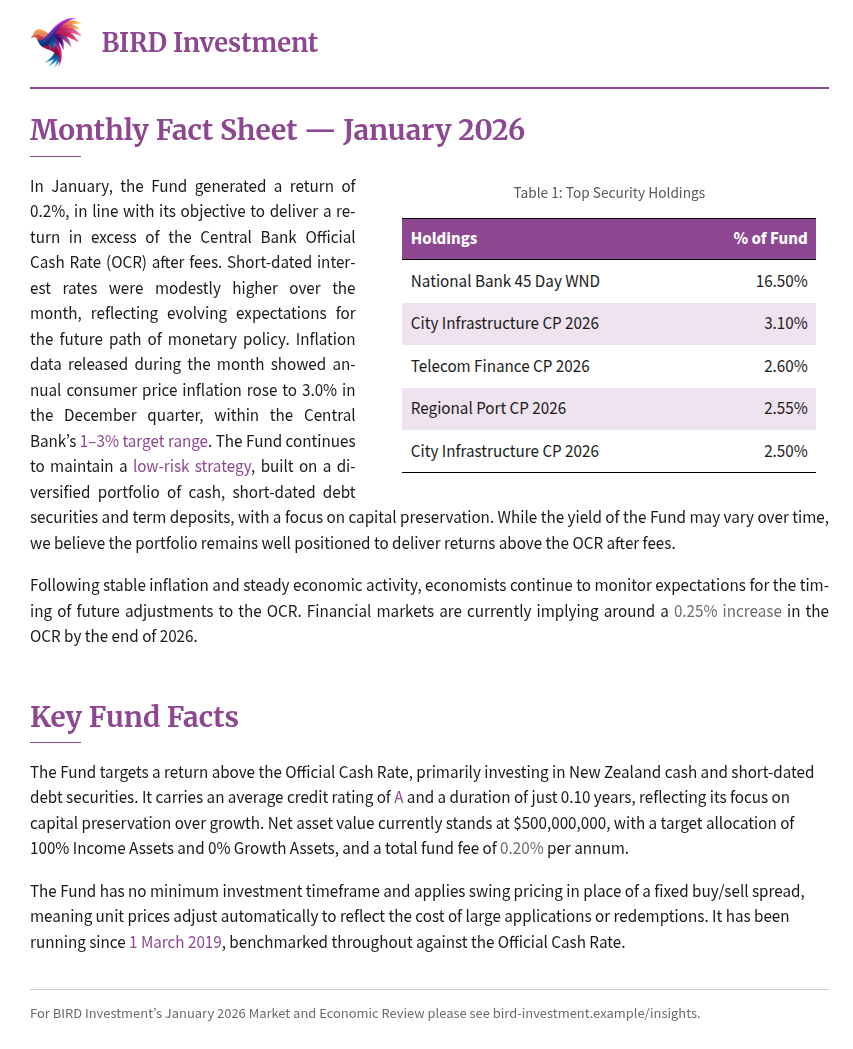
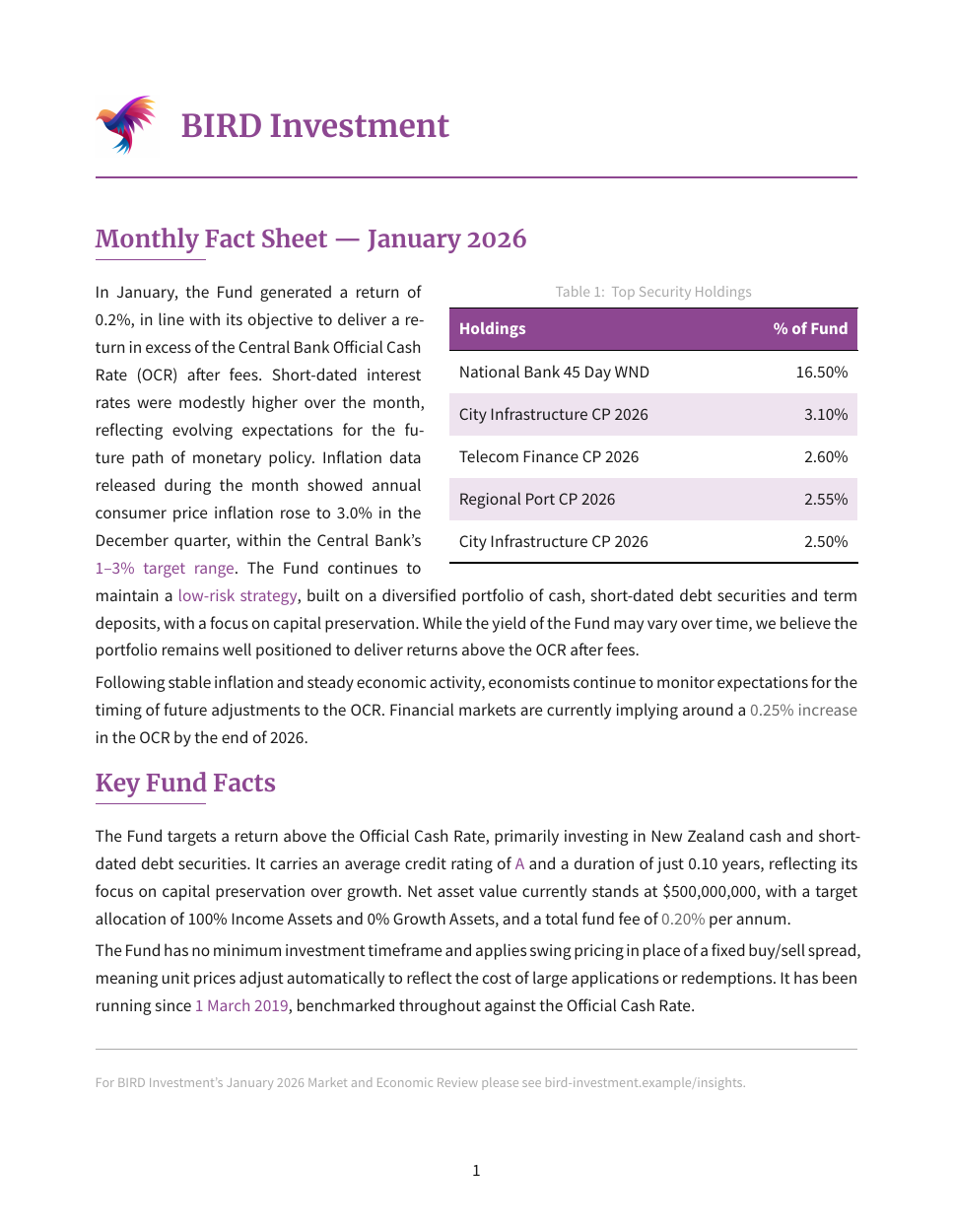
HTML-rendered version of the demo Quarto fact sheet, styled with the workshop's brand colors and fonts Typst-PDF-rendered version of the same demo fact sheet, same brand, produced from the same .qmd file

Same .qmd source, same brand. Click a tab to compare the two renders.

What this workshop solves

One Quarto source. Two beautiful, on-brand outputs.

Quarto can already render the same document to HTML and to a Typst PDF. This workshop shows you how to make both outputs actually look designed, on-brand, and consistent with each other, using a repeatable Lua-filter pattern instead of guesswork.

๐Ÿ”

One Source, Two Outputs

Render a polished HTML page and a matching Typst PDF from the same .qmd, instead of hand-building each one separately.

๐ŸŽจ

Consistent Branding

Set your logo, colors, and fonts up once and have them apply identically across HTML and PDF, no re-approximating by eye.

๐Ÿ“„

PDFs That Look Designed

Turn Quarto's default Typst output into a real branded template: proper type, color, and layout instead of a generic default.

๐Ÿงฑ

A Reusable Setup

Package your styling into a Quarto extension, so every new report starts from a solid, shared base instead of from scratch.

๐Ÿช„

Lua Filters, Demystified

Learn one clear, repeatable pattern for writing Lua filters, so you can build your own instead of guessing at the syntax.

๐ŸŒ‰

Bridging the Translation Gap

Learn the technique to correctly translate any Quarto authoring construct into Typst output, so you're never stuck with the default.

Curriculum

Three hours. One real, reusable extension.

We build a working demo extension live, using a fictional investment fund's fact sheet as the running example, and cover exactly what's needed to adapt it to your own brand afterward.

Part 1

Branding & Beautiful PDFs

Get your brand onto both HTML and Typst PDF output.
  • 1Attach a logo, brand colors, and fonts to both HTML and Typst PDF output from one theme
  • 2Build a real Typst template function with typeset tables and a styled company header
  • 3Keep HTML and PDF visually in sync: edit the brand once, both formats update
  • 4Style tables and headings so a Typst PDF stops looking like an unstyled LaTeX default
Part 2

Lua Filters & Packaging

Close the Quarto-to-Typst gap, then package it for reuse.
  • 1What a Lua filter actually does, and why some Quarto constructs need one to reach Typst correctly
  • 2Write filters that call typed Typst functions instead of concatenating raw strings
  • 3Build a table that reads well in both formats, with body text wrapping around it
  • 4Add inline colored text spans, e.g. [text]{.text-primary}, that render correctly in HTML and PDF alike
  • 5Package everything into a single reusable, installable Quarto extension
AR
About the instructor

Hi, I'm Dr. Albert Rapp ๐Ÿ‘‹

I have a PhD in Mathematics and spend a lot of my time at the intersection of Quarto, Typst, and PDF automation, figuring out how to make R and Quarto output look genuinely designed instead of default. I've previously taught a live session on building automated PDF pipelines with Typst, and this workshop applies the same hands-on, build-it-live approach to branding Quarto's HTML and Typst output and packaging that work into a reusable extension.

[X]+newsletter subscribers
[X]+YouTube subscribers
[X]+LinkedIn followers
Reserve your spot

Join the live session

Live delivery, real-time Q&A, and a working extension you can adapt to your own brand afterward.

[Date] ยท [Time, Timezone] ยท Live on [Platform]
$[XXX] / seat
  • โœ“3-hour live workshop, taught end-to-end from a plain Quarto document to a packaged extension
  • โœ“Live Q&A throughout, bring your own branding questions
  • โœ“The reusable Quarto extension built live, plus the full demo repo, as a takeaway
  • โœ“Recording, in case you can't attend live
Save my seat โ†’
FAQ

Frequently asked questions

Do I need prior Typst or Lua experience?

No. We start from a plain Quarto document and build up the branding, the Typst template, and the Lua filter live, step by step. Nothing here assumes you've written Typst or Lua before.

Do I need to already use Quarto?

You should be comfortable authoring a basic .qmd document (Markdown plus the occasional code chunk). You don't need any prior experience rendering to Typst or building extensions, that's exactly what we cover.

What do I walk away with?

The full demo Quarto extension built during the session, the demo repo it comes from, and everything needed to swap in your own logo, colors, and fonts and reuse it on your own reports.

Is there a recording if I can't attend live?

Yes, all registered attendees get access to the recording, but live attendance is where you get to ask questions specific to your own branding and document setup.

What if I can't make the live time?

Register anyway. You'll still get the recording and the full extension + demo repo takeaway, you'll just miss the live Q&A.

Stop rebuilding the same report twice.

In one 3-hour session, build a branded, reusable Quarto extension yourself, HTML and Typst PDF from a single source file, and leave with the extension and demo repo to do it again.

Save my seat โ†’